

What’s the best resume format in 2027?
More employers are hiring for skills, not just credentials. Many now use AI to screen applicants. And concern is growing that resumes written with AI tools all sound the same.
Much has changed in the last 12 months, but one thing hasn’t: a concise, well-organized and accurate resume is still your ticket to a job interview. And the format you choose matters, because it shapes how a recruiter, or a screening tool, interprets your candidacy.
This guide compares four resume formats for 2027, explains when to use each and shows how to make your case without sounding like every other applicant. Plus, each format comes with a free template you can download and edit, so bookmark this page as your definitive resume guide for the year ahead.
Quick answer
For most job seekers, the best resume format in 2027 is the reverse-chronological resume: your most recent role first, in a single column, with clear dates and measurable results. If you’re changing careers, returning to work or your strongest qualifications span several roles, a hybrid (combination) resume is usually the better fit. Students and recent graduates often do best with an early career resume that leads with education, internships and projects.
Whichever format you choose, the content should be unmistakably yours: specific, accurate and in your own voice. Use AI to edit it, not to write it.
What’s changed in resume writing for 2027?
Three shifts are shaping how resumes get noticed this year:
- Skills-based hiring is growing. J&J recruiters look for concrete evidence of skills like teamwork, problem-solving and communication, especially in early career roles. On your resume, do your best to show how you’ve applied those skills in different contexts; simply listing them under “Core Competencies” doesn’t pack the same punch.
- Technology is part of screening at many organizations. With large enterprises especially, you’ll likely apply through an applicant tracking system (ATS), which means software reviews your resume before a human recruiter. It also means that a clean resume structure, with standard headings and fonts, matters more than ever.
- Employers may be wary of generic, AI-written resumes. Potential warning signs include vague achievements without evidence, language that closely mirrors the job posting, abrupt shifts in tone or writing style, and skills or experiences a candidate can’t discuss with confidence. The greater risk, however, is sameness: a resume so polished and generalized that the individual behind it disappears. At J&J, we want to understand what makes you distinctive, so use AI as an editing tool, not a substitute for your own experience, perspective and voice.
The real AI risk: a resume that sounds like everyone else’s
AI tools are good at producing polished, professional-sounding sentences. The catch is that they tend to produce the same ones for everyone. When many applicants start from the same tools and the same job posting, their resumes drift toward the same phrases and the same short list of strengths: “results-driven,” “detail-oriented,” “proven track record of cross-functional collaboration” and so on.
For J&J recruiters, that can be a real drawback, because what we want to see and hear is you: your experiences, the problems you’ve solved, what you like to do and the way you think about your work. (For more on where AI helps and where it falls short, see the pros and cons of generative AI for resumes and cover letters.)
Try the swap test
Read each line of your resume and ask: Could another candidate paste this into their own resume, unchanged, and have it still ring true? If so, it should probably be revised. Try to rewrite it with something only you could say—for example, the project, the number, the constraint you worked around, what actually happened and why it mattered to you.
Four ways to keep your voice
- Write the first draft yourself, then use AI to tighten it. Editing your own words (and further editing after an AI-supported revision) will help preserve your authentic voice.
- Read it out loud. If a sentence doesn’t sound like something you’d say in real life or in a job interview, revise until it does.
- Cut stock phrases. Aim for descriptions that tell a reader something truly distinctive about who you are and what you bring to the table.
- Borrow the posting’s keywords, if applicable, but not its personality. It’s okay to include some of the skills listed in the job description in your resume, provided they accurately reflect your candidacy, but you need to describe what you’ve done—and how you’ve made these skills uniquely your own—in your own words.
Resume formats at a glance
Use this table to find your starting point, then select a format to jump to its section.
| Format | Best for | Leads with | Watch out for |
|---|---|---|---|
| Reverse-chronological | Most job seekers with steady experience in their field | Your most recent role | Gaps and career pivots are front and center |
| Hybrid (combination) | Career changers, people returning to work, broad skill sets | Summary and key qualifications, then work history | Can run long; every skill needs proof |
| Skills-based (functional) | Freelancers, consultants, nontraditional paths | Skill areas and project outcomes | Hard-to-follow timeline; easy to fill with buzzwords |
| Early career (education-first) | Students, recent grads and internship, co-op or apprenticeship applicants | Education, internships and projects | Move education lower once you gain experience |
Format 1
1. Reverse-chronological resume
Overview
- Lists your experience from your current or most recent role backward
- Still the most widely used resume format
Best for
- Candidates with steady experience in the field they’re targeting
- Anyone moving up within the same function or industry
Advantages
- Tells a clear, linear story of your career growth
- Familiar to recruiters and easy for applicant tracking systems (ATS) to read
Drawbacks
- Puts employment gaps and short stints front and center
- Buries transferable skills and older, relevant experience if you’re changing direction
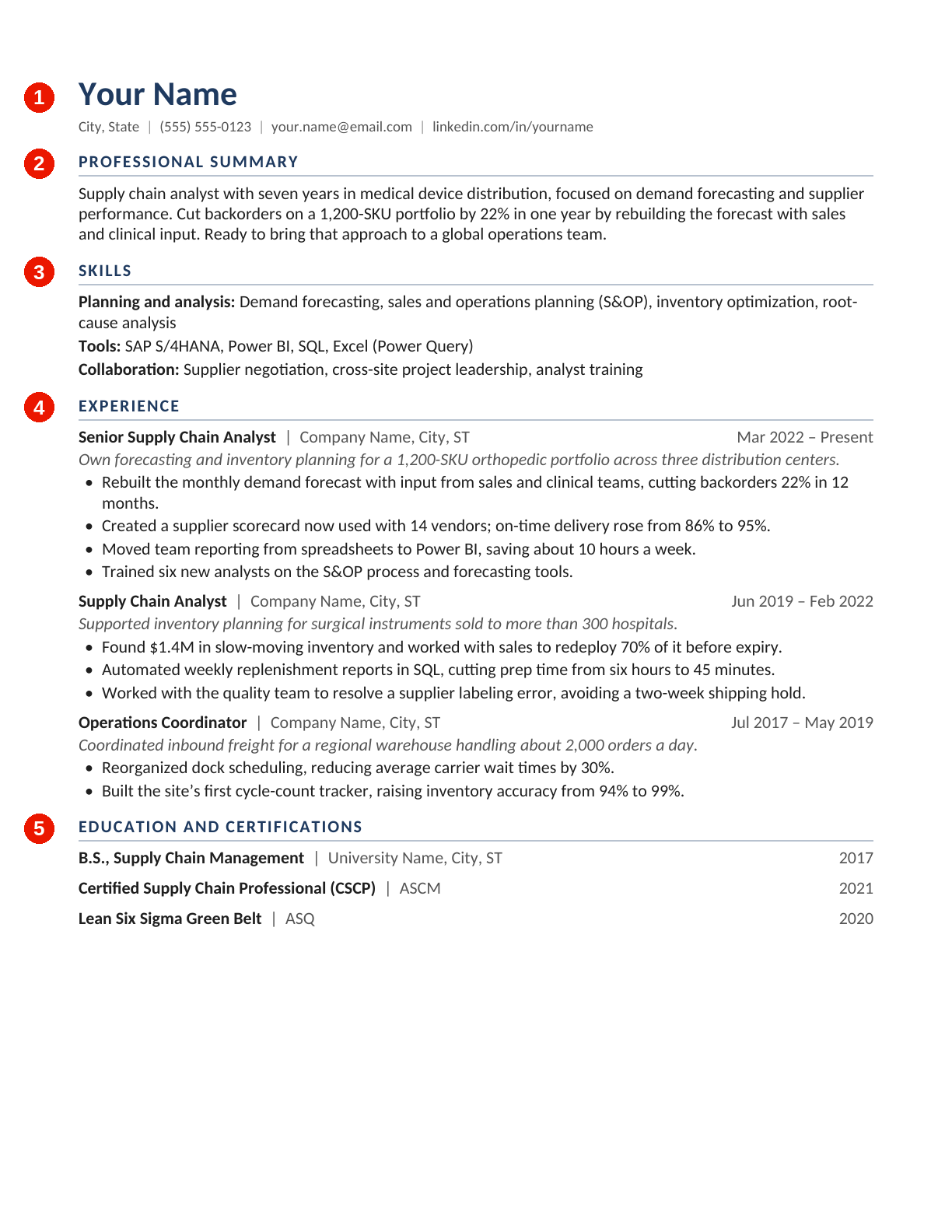
The numbered steps below match the numbers on the template. Download the reverse-chronological resume template (Word) to edit it, or view it as a PDF.
- Header. Add your name, city and state (or region), phone, email and a LinkedIn or portfolio link (get your online presence application-ready first). Skip your street address, and leave off a photo unless it’s customary where you’re applying.
- Professional summary. In two or three sentences, connect your experience to the role you want. Use the posting’s key terms where they accurately describe you, but write the rest the way you’d explain your work in an interview.
- Skills. List 8 to 12 skills from the posting, grouped by type, and include only those your experience section backs up.
- Experience. For each role, list your title, organization, location and dates (month and year). Add one line describing the scope of the role, then three to five bullets that pair an action with a measurable result.
- Education and certifications. List your degree and the school that awarded it, plus any certifications and the organizations that issued them.
Format 2
2. Hybrid (combination) resume
Overview
- Opens with a summary and key qualifications grouped by skill, then follows with a reverse-chronological work history
- Also called a combination or combined resume, it pairs the skills-first focus of a functional resume with the timeline recruiters expect
Best for
- Career changers who need to show transferable skills up front (see how one nurse made the move to J&J)
- People returning to work after a break
- Professionals whose best evidence spans several roles, projects or industries
Advantages
- Puts your most relevant skills first without hiding your titles and dates, which makes it a natural fit for skills-based hiring
- Easy to tailor: swap the qualifications section for each role you apply to
Drawbacks
- Can run long, and skill claims without proof read as filler
- Needs clear, standard headings; creative labels can confuse readers and parsers
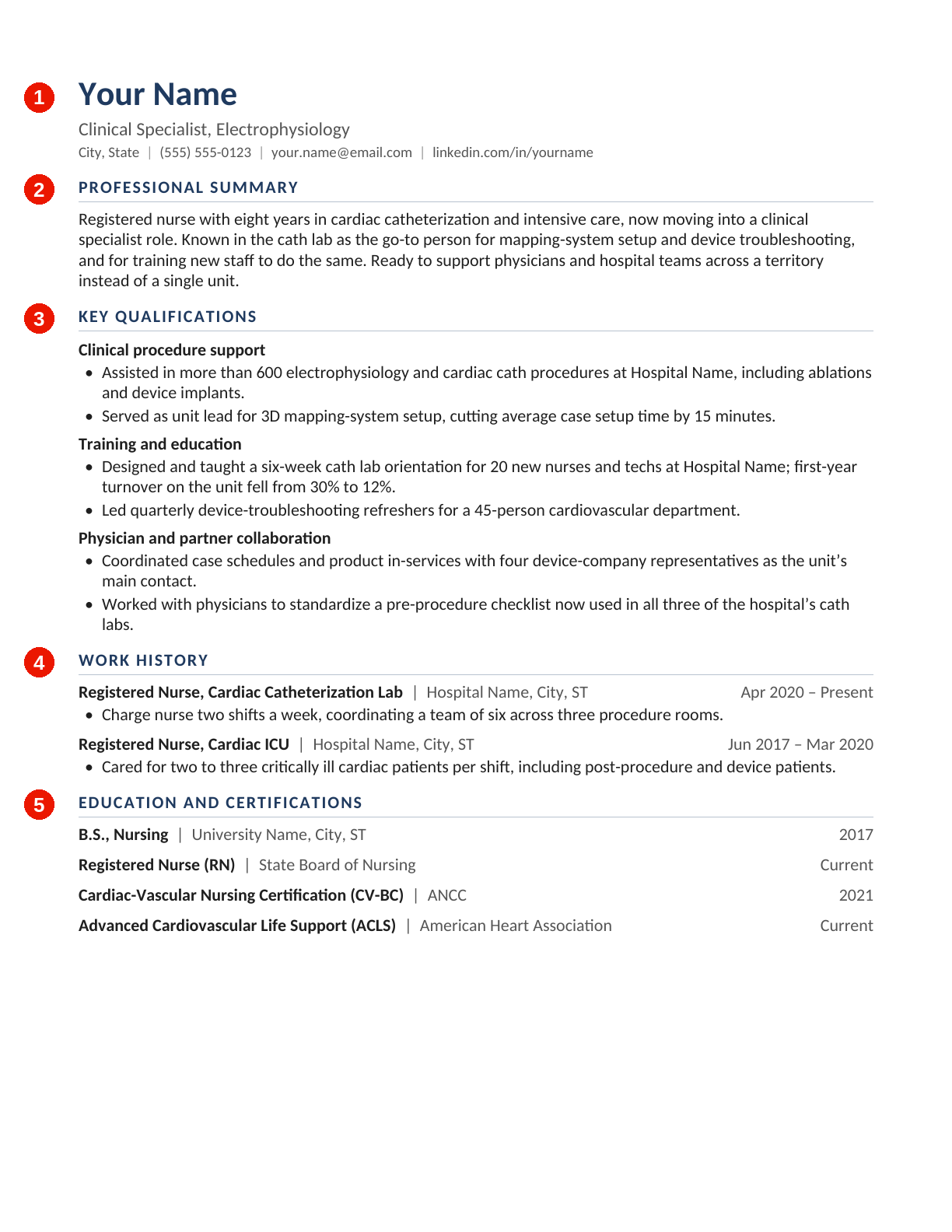
The numbered steps below match the numbers on the template. Download the hybrid (combination) resume template (Word) to edit it, or view it as a PDF.
- Header and target role. Add your contact details, then a one-line title naming the role you’re pursuing.
- Professional summary. Two or three sentences on what you bring and why it fits. If you’re changing careers, explain the move in your own words. Our recruiters want to understand why you’re making the switch, not just that you are.
- Key qualifications. Choose three skill areas from the job posting. Under each, add two bullets with specific, quantified proof, and say where it happened.
- Work history. List roles in reverse-chronological order with titles, organizations and dates. Keep it to one to three bullets per role so you don’t repeat the section above.
- Education and certifications. Close with degrees, certifications, training and relevant professional development.
Format 3
3. Skills-based (functional) resume
Overview
- Organizes your background by skill area or project rather than by employer, with a condensed work history at the end
- Use with care: of the four formats, it raises the most questions for recruiters and screening software
Best for
- Freelancers, consultants and contractors with many short engagements
- People whose most relevant experience comes from volunteering, caregiving, independent projects or military service (tips for transitioning service members)
Advantages
- Leads with what you can do and the results you’ve delivered
- Turns many short engagements into one story that’s easy to read
Drawbacks
- Makes it hard to tell where and when skills were built, and some recruiters see the format itself as a red flag
- Some applicant tracking systems read it less reliably when titles and dates are separated from skills
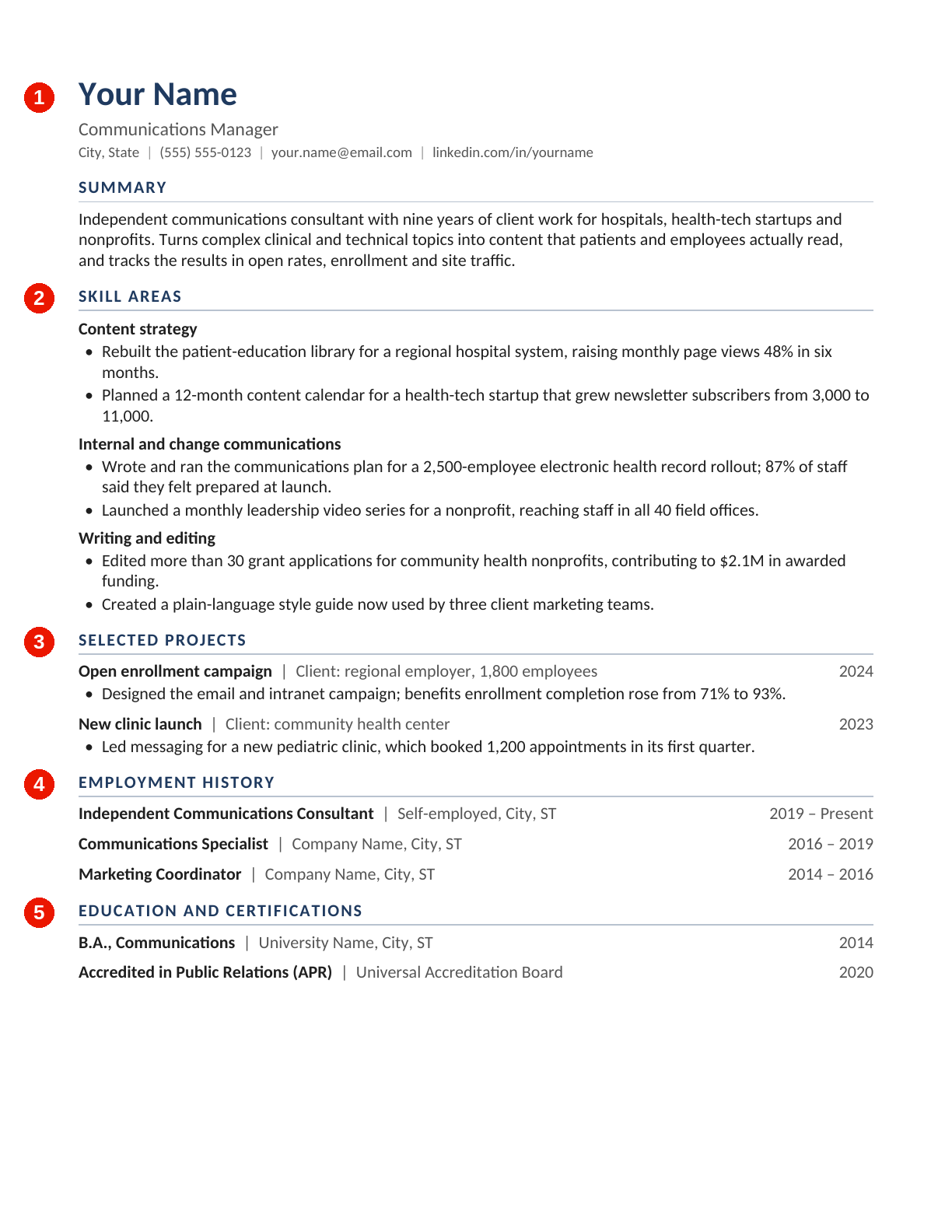
The numbered steps below match the numbers on the template. Download the skills-based (functional) resume template (Word) to edit it, or view it as a PDF.
- Header, target role and summary. Add your contact details, the role you’re applying for and a short summary that answers one question: Why are you the right candidate for this job?
- Skill areas. Pick three or four skill areas from the posting. Under each, add bullets that name the project or client, what you did and the result: dollars saved, time cut, people reached.
- Selected projects. Optionally, spotlight two or three projects with the organization, your role and the outcome.
- Employment history. List each role in one line: title, organization and dates. Keep it short, but keep it.
- Education and certifications. Close with relevant degrees, certifications and training.
Format 4 · New for 2027
4. Early career (education-first) resume
Overview
- A reverse-chronological resume that leads with education, internships, projects and campus leadership instead of a long work history
- New to this guide for 2027, as more employers look for evidence of skills from early career candidates, not just a GPA or degree
Best for
- Students and recent graduates
- Applicants for internships, co-ops and apprenticeships (compare our early career programs)
- Graduate students moving into industry (see how one researcher made the switch)
Advantages
- Leads with your strongest, most recent credentials and gives projects and internships room to show skills in action
- Usually fits on one page
Drawbacks
- Can lean on coursework that describes topics rather than results
- Needs reworking after a year or two of full-time experience, when it’s time to switch to reverse-chronological
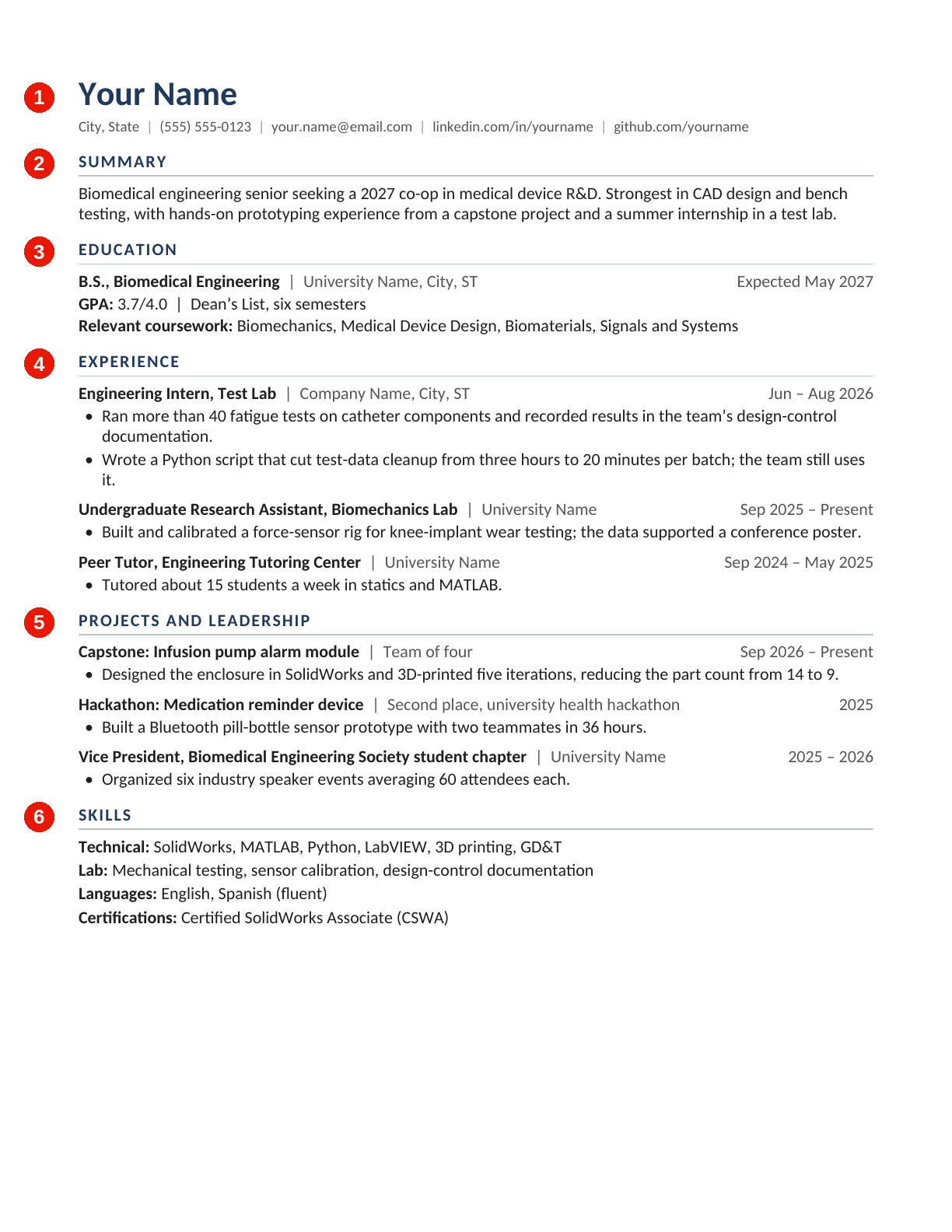
The numbered steps below match the numbers on the template. Download the early career (education-first) resume template (Word) to edit it, or view it as a PDF.
- Header. Add your contact details plus a LinkedIn profile, portfolio or GitHub link if you have one.
- Summary. One or two sentences on the kind of role you’re seeking and the strengths you bring to it.
- Education. List your degree, school and expected graduation month and year. Add honors and relevant coursework; include your GPA only if it’s strong or requested.
- Experience. Include internships, co-ops, research, part-time jobs and campus roles, with bullets that pair what you did with a result.
- Projects and leadership. Spotlight two or three projects (class, capstone, hackathon or personal) that show the skills in the job posting.
- Skills. Close with technical skills, tools, languages and certifications.
For more pointers, see our resume best practices for college students.
Before you apply: 2027 resume checklist
Whichever format you choose, run through this list before you hit submit.
Make it easy for software to read
- Keep the layout simple. Use one column and standard headings like Summary, Experience, Education and Skills. Skip tables, text boxes, icons and graphics, which can get scrambled when reviewed by the types of software screening tools that many employers rely on.
- Follow the application’s file instructions. If you have a choice, a text-based PDF or a Word document is a safe bet. Don’t upload a screenshot or image of your resume.
- Run the copy-paste test. Paste your PDF into a plain-text editor. If it comes out garbled or looks strange, the screening tools and parsers that employers use may struggle to make sense of it, too.
Make it easy for a recruiter to read
- Choose readable type. Use a common font like Arial, Calibri, Aptos or Georgia at 10 to 12 points, with margins of 0.5 to 1 inch.
- Mind the length. One page is usually enough early in your career; two is common for more experienced professionals.
- Tailor every application. Treat each job description as your checklist and use its key terms where they’re accurate. It’s okay to borrow parts of the vocabulary from the job description, but make sure the voice remains your own.
- Quantify your impact. Think of numbers as evidence, and use them to help transform vague tasks and responsibilities into specific achievements.
- Name your file clearly. For example: FirstName-LastName-Resume.pdf.
Make it yours
- Use AI as an editor, not an author. Start from your own draft and fact-check every line.
- Run the swap test. If another applicant could claim a line unchanged, make it more specific.
Put your new resume to work
Once your resume is in the right format and sounds like you, it’s time to search and apply for job opportunities at J&J.
Before you go, you should also join our Global Talent Hub to hear about roles that match your interests.
Finally, if you have additional questions about resume best practices for 2027, consult the following FAQs for guidance.
Resume format FAQs
Similar posts
Stay updated with the latest news, insights, and stories from Johnson & Johnson.

Generative AI for resumes and cover letters: Pros and cons
Why communicating authentically—and in your own voice—is probably a better approach to writing resumes or cover letters than leveraging generative AI.

Breaking down behavioral interview questions in 4 simple steps
Here’s a quick breakdown of behavioral interview questions—what they are, why they matter and how to prepare—so you can answer with confidence.

7 resume best practices for college students
How do you put together a great resume when you're still in college—and may not have a lot of professional experience to speak of? We've covered all your pain points to help you launch your career.

Career transition Q&A: From the hospital to the electrophysiology team at J&J
After seven years in nursing, Marco P. made the move to electrophysiology at J&J. Why he transitioned—and what he’s learned—might inspire you to join him on our team.

Best practices for accepting (or declining) a job offer
If you’ve just received a job offer, congratulations are in order—but you’ll also have to make a potentially tough decision soon. Here’s everything you need to know to handle the moment with cool, calm and collected professionalism.

9 best practices when returning from parental leave
The ins and outs of returning to the workplace may be the last thing on your mind when you're welcoming a new life to your family, but it's a good idea to put together a game plan for your eventual return. Here are nine tips to make that transition as smooth as possible.
Join our Global Talent Hub
Wherever you are in the world or your career, we want to get to know you! Sign up for our talent community and share your career goals—it’s the first place our recruiters look when they have a new role.
